
Firstly – before we get into all the helpful stuff, thanks for being part of the amp&go community, together we can break down the barriers of influencer marketing, making it easy, simple and transparent for everyone.
Let’s do this! 🚀
amp&go is an end-to-end influencer marketing platform built to help you leverage social media influencers to market your product, platform, mobile app or game. Founded by a previous employee of Apple, amp&go has expert knowledge and longstanding experience across digital & brand marketing.
What’s unique about amp&go basic campaigns is you select the metric objective (either impressions, engagements, video views or clicks) that you want influencers to generate for your product, and the goal that you want to achieve. Your campaign won’t complete until that goal has been met. It’s really easy to get up and running. 🏃♀️🏃♂️
Influencers submit their campaign applications directly on amp&go. You’re then able to approve the influencers you want to work with. From there, they upload their posts, and you approve those on the platform too. It’s that simple, and the platform is built to scale to your needs. ✅
Every impression, engagement, video view or click has a cost. You choose how much you want to spend, and amp&go shows you the performance you can drive for your budget. Unlike other platforms or services, there are no hidden charges, or additional costs, you only pay for what you get.
Here at amp&go we like to keep things transparent, so all your data is housed in charts and infographics. You can download it too. 🤓
amp&go premium is a fully-managed / agency model – where brands can leverage the amp&go team for planning, strategy, and campaign optimization. Please contact amp&go if you would like to discuss pursuing an amp&go premium business model.
All talent approvals for amp&go premium campaigns are made in advance of the campaign commencing. Your amp&go account manager will source talent, and provide rich insights, including a host of demographic data to help guide and action influencer approvals. ✅
Payment for an amp&go premium campaign is made in accordance with the campaign’s agreed upon Statement of Work (“SOW”). Each campaign SOW, will outline the campaign forecasted goal, the number of influencers to be activated, the timeline for execution, the budget, and the invoice and payment dates.
amp&go premium includes a 10% service fee.
All performance and reporting for an amp&go premium campaign is housed within amp&go. Your account manager will also provide performance reports during and after the campaign for deeper insights, and analysis. 🤓
amp&go ads is a fully-managed / agency model – where brands can leverage the amp&go team for planning, strategy, campaign optimization and content licensing. Please contact the amp&go team if you would like to discuss pursuing an amp&go ads business model.
All talent approvals for amp&go ads campaigns are made in advance of the campaign commencing. Your amp&go account manager will source talent, and provide rich insights, including a host of demographic data to help guide and action influencer approvals. ✅
Payment for all premium / ads campaigns is outlined in your SOW, this will be finalized between the brand and the amp&go team.
amp&go ads includes a 10% service fee.
All performance and reporting for an amp&go ads campaign is housed within amp&go. Your account manager will also provide performance reports during and after the campaign for deeper insights, and analysis. 🤓
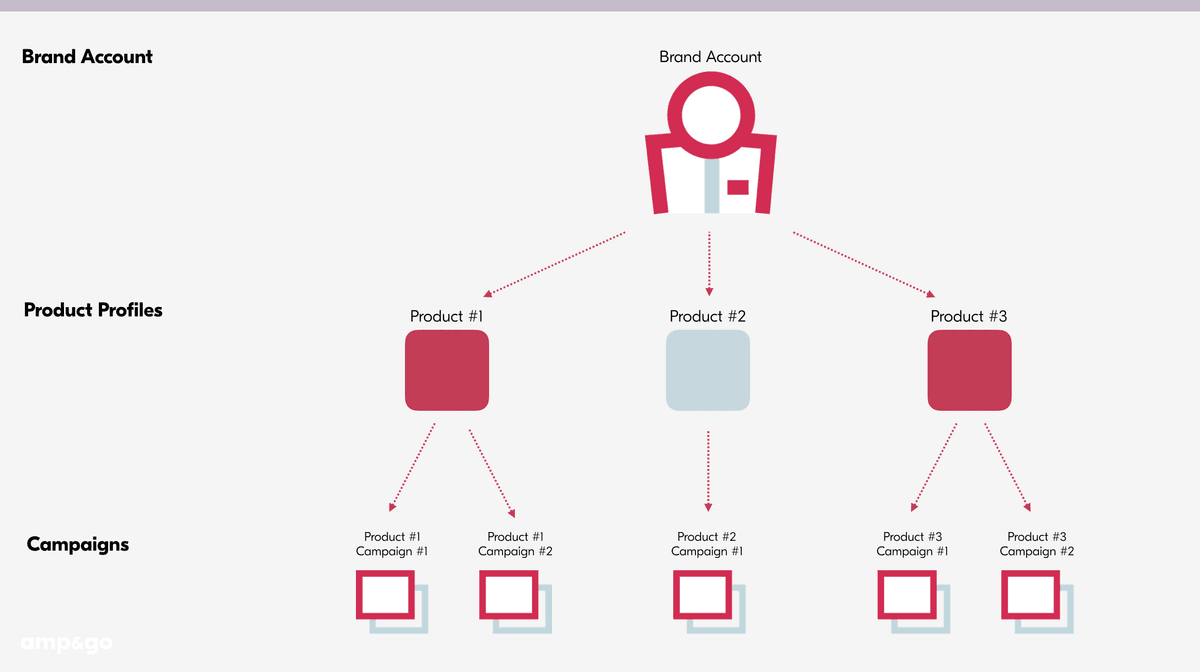
On amp&go it’s important to understand the difference between your ‘Brand Account’ and your ‘Product Profile’ – see below for more information.
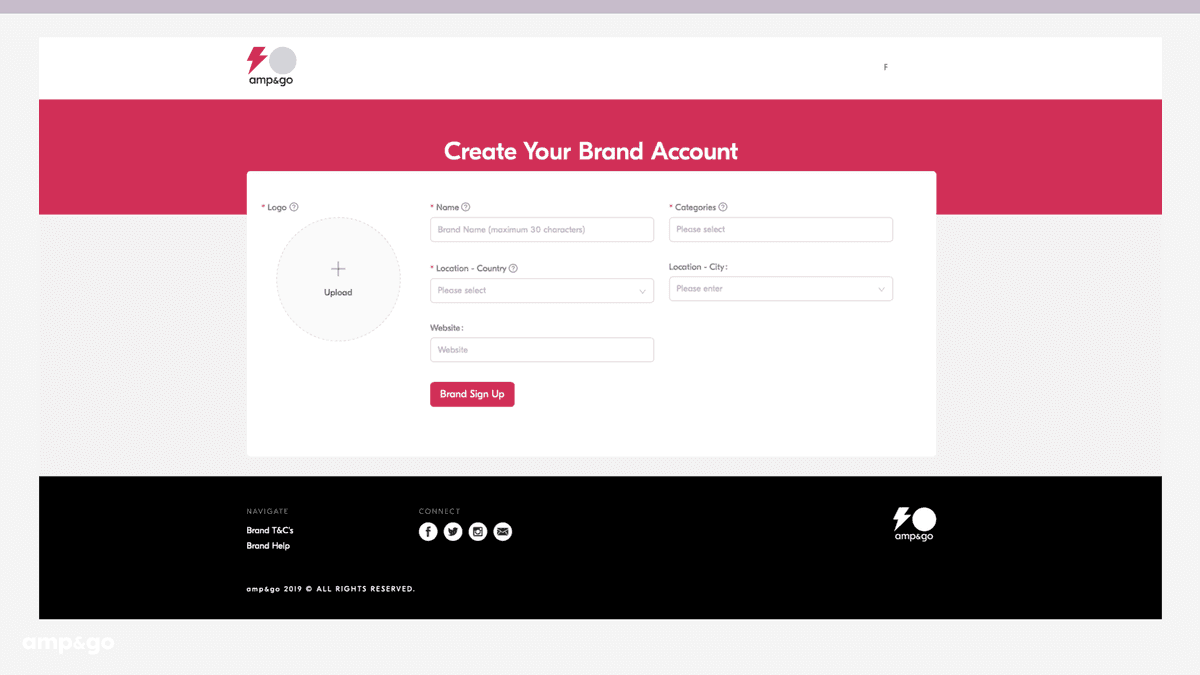
After you’ve signed up and verified your email address you’ll be prompted to Create your Brand Account. The information that you provide here will be visible for influencers to see. Things to consider when creating a new ‘Brand Account’ ✍️:
- Your ‘Brand Name’ on amp&go, should match your business or company name (you’ll create profile pages for each of your products later on)
- Please keep your ‘Brand Name’ below 30 characters
- Pro tip 💡: When adding your ‘Logo’ use one of your social profile pictures
- Upload a ‘Logo’ thats 5MB or smaller
- Input categories that align with your brand
- There’s a maximum number of five categories per brand account. These will be helpful for an influencer to get a quick grasp of the type of company you are
All your ‘Brand Account’ information can be updated or changed anytime in your ‘Edit Brand Account’ page.
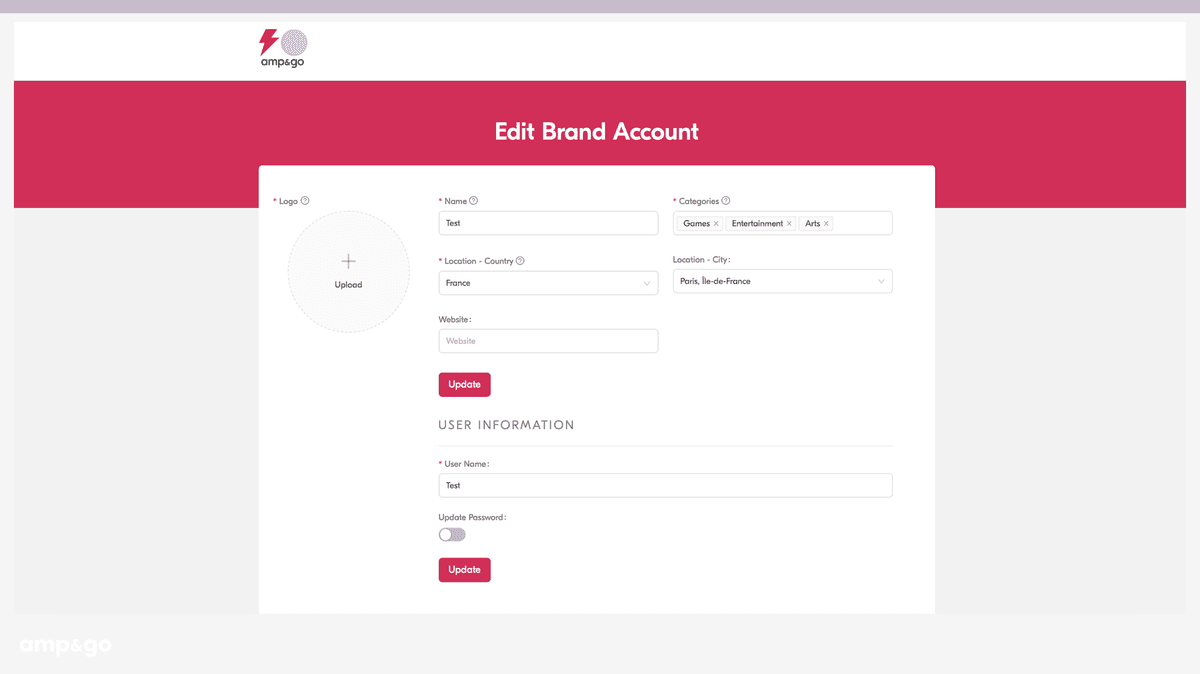
You can update your user information (username and password) anytime in the ‘Edit Brand Account’ page.
Once you’ve finished creating your ‘Brand Account’, you’ll create a ‘Product Profile’ for each of your products. Things to consider when creating an ’Product Profile’ ✍️:
- You can create a new ‘Product Profile’ anytime from your ‘Product Dashboard’
- Keep your ‘Product Name’ below 30 characters
- Pro tip💡: When adding your ‘Product Icon’ use one of your social profile pictures
- Please be sure to upload an ‘Icon’ thats 5MB or smaller
- Input categories that make sense for your product
- There’s a maximum number of five categories per ‘Product Profile’. When selecting these keep in mind influencers may search for campaigns by category
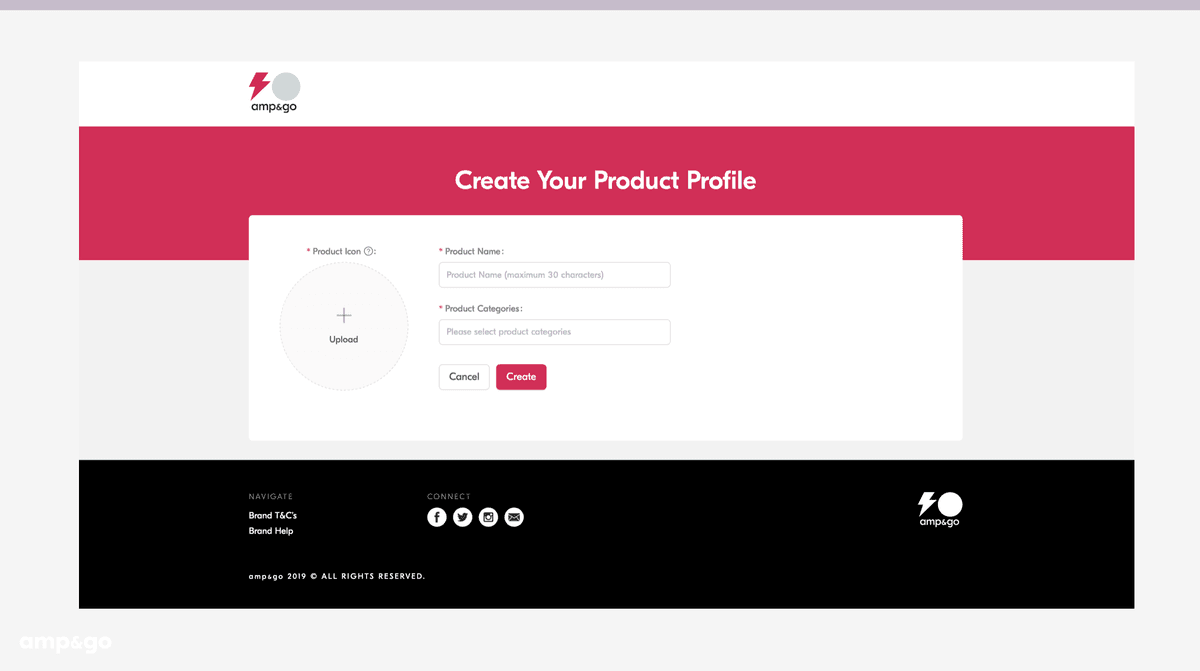
Once you’ve created your ‘Product Profile’ it will show up in your ‘Product Dashboard’. From here you can edit or update your product information anytime via the ‘Edit Product Profile’ button.
If you’re a brand with multiple products, it’s easy to switch from managing one to another. You can do this by clicking on the product you want from your ‘Product Dashboard’, or you can toggle between products via the ‘Product Profile’ drop down in the menu. Once you click on a product you can create campaigns, take actions and check performance.
All your product profiles live inside your ‘Product Dashboard’. Once you’ve selected the product you wish to manage, you’ll be taken through to your products homepage. Here you can create campaigns in your ‘Campaigns’ tab, approve campaign applications, or posts, in your ‘Actions’ tab, and check on how your campaigns are doing in your ‘Performance’ tab.
When a campaign ends, influencers can rate their experience working with your ‘Product Profile’. Your ‘Brand Account’ rating is then the average of all of your ‘Product Profile’ ratings on amp&go. ⭐️
When a campaign ends, influencers get the chance to rate their experience working with your ‘Product Profile’. You need to have at least 5 ratings, before yours becomes visible. ⭐️
This graphic shows the hierarchy between your ‘Brand Account’, ‘Product Profiles’, and ‘Campaigns’.
The important part: how campaigns work… Here are the ins and outs of campaign creation, setting your objective, and making payment.
Once you’ve selected a ‘Product Profile’, you’ll find yourself on your product homepage in a tab titled ‘Campaigns’. This is where where you can create a new ‘Campaign’. Creating a campaign consists of providing information / or your brief, setting your objective and budget, and making payment.
An influencers content is only as good as the information and guidance that they’re provided, so it’s key that you include as much detail here as possible.
Here are things to consider when filling out this page ✍️:
- If you’re creating a campaign for a physical item and need to ship product to the influencer, you must include the following copy in your Campaign Description field (this will inform the influencer to give you this information):
- “If you’re applying to this campaign you must include your current full shipping address so we can ship product to you. If you don’t include this we won’t be able to approve your application.”
- Use your product social media icon, or an image of the same resolution as your ‘Campaign Image’
- Upload a ‘Campaign Image’ thats 5MB or smaller
- Keep your ‘Campaign Name’ under 30 characters
- If you set your ‘Start Date’ in the future, you can still approve influencer applications and posts. However, the influencer will not be able to publish the post until the start date
- Select which platform you want to market your product (a website, or Google Play or the App Store if it’s a mobile app)
- If you select Google Play or the App Store, be sure that your ‘Product Link’ matches the ‘Product Platform’ that you selected
- If you selected App Store as your ‘Platform’, and your app is not available yet, you can insert a public URL (Testflight) to ensure the influencer can test and use the app ahead of launch
- You can create a campaign without a ‘Product Link’, however, you will need to add this prior to approving any influencer posts. You can do this anytime by clicking ‘Add Link’ on your campaign page. amp&go will remind you to do this
- You only need to place the direct link to your product / website – amp&go will add tracking to this automatically
- When asked ‘what are the social channels you prefer for this campaign?’ it’s advisable to select them based on your campaign goal and objectives
- When describing what the campaign is, and whether it ties into a broader marketing initiative, please include details that will both guide, and inspire an influencer to make great content
- Don’t forget to fill out the ‘Target Demographic’ and ‘Tactical Requirement’ sections at the bottom of the page. This will help amp&go find you the best influencers for your campaign. It will also help guide influencers creative and copy
- You can edit your campaign information, up until the moment that you’ve approved your first influencer
Once a campaign is created, all campaign information is viewable by influencers. 🧐
What’s unique about amp&go is you choose the objective you want to drive – either impressions, video views, engagements or clicks (downloads are coming soon) – and you set the budget you want to spend. amp&go will then calculate your campaign goal, and the cost per objective.
Things worth noting ✍️:
- Select your ‘Objective’ carefully, as you won’t be able to change this after the campaign has been created
- Different objectives have different associated costs i.e. impressions will be cheaper than clicks
- The minimum budget for a campaign is $10,000
- The higher your budget, the lower the cost per objective, so be sure to customize your objective and budget fields appropriately
- Your ‘Campaign Goal is calculated and defined by the objective you have selected, and your campaign budget
- ‘Cost per Objective’ on the platform can change on a daily basis, determined by market & industry trends, cyclical fluctuations, and levels of demand and supply on-amp&go. However, once you’ve created and paid for your campaign, you lock in the cost per objective that you paid for (i.e. even if the platform cost per objective changes afterwards, it won’t affect the cost per objective that you agreed upon, and paid for, for your campaign)
- Your campaign will complete once your goal is achieved
- Lastly, after you create your campaign, you can add more investment up until the moment when you approve your first influencer. What’s great about adding more investment is amp&go guarantees the cost per objective that you agreed upon at campaign creation
To ensure we guarantee your cost per objective throughout the tenure of your campaign, and to ensure we pay your influencers in real-time, we take payment upfront, so take your time when filling out the ‘Objective’ section
The last stage of campaign creation is payment. It’s important to note that your campaign cannot begin until payment has been made. Unlike other platforms or services, there are no hidden charges, or additional costs, you only pay for what you get, and thats your goal multiplied by the cost per objective. These numbers are based upon the objective that you want to drive, and the campaign budget that you set at the campaign creation stage.
Here are your payment options:
- If your campaign budget exceeds $20,000, or if you’d like to speak to our team prior to making payment, please select ‘Contact Us’, we’re here to help. By selecting this option you’ll work with the amp&go team to make payment directly
- Once payment has been secured ✅ influencers will be able to apply to your campaign
Lastly, one of the great things about amp&go is your campaign payment covers performance up until you hit your goal. Any performance that a live post generates after this point, is considered free earned media.
Once you’ve paid for your campaign you can begin to invite influencers to apply to it.
Influencers will be recommend to you after campaign payment, as well as in your ‘Campaign Page’. Note, influencers will also be able to search and apply to your campaign on their own.
All active campaigns can be found in the ‘Active Campaign’ section within your ‘Campaigns’ tab. Here, in a listicle view, you can see the top-line information and performance for how your campaign is doing. You can click through for a more comprehensive view. 🔍
A campaign page holds all information for your campaign. Here you can track your live campaign performance, invite influencers, export your campaign data, and see whether you have any pending applications or posts to approve.
You can edit campaign information by clicking the ‘Edit Campaign’ button. You can do this any time, up until the point that you approve the first influencer.
You can add more investment to a campaign, and increase your campaign goal, by clicking the ‘Add More Investment’. You can add investment any time, up until the point that you approve the first influencer. It’s worth noting that adding more investment has the same guidelines as making a campaign payment:
- If your campaign investment increase exceeds $20,000, or if you’d like to speak to our team prior to making payment, please select ‘Contact Us’. By selecting this option you’ll work with the amp&go team to make payment directly – we’re here to help
What’s great about adding more investment is amp&go guarantees the cost per objective that you agreed upon at campaign creation. 👌
You can duplicate a campaign at any time by clicking the ‘Duplicate Campaign’. This is a great way to mirror the information you’ve already filled out. You may want to use this option in the following scenarios:
- You want to have two campaigns with the same information but different goals (i.e. you may want one performance / click driving campaign and one awareness / impressions driving campaign)
- Your campaign has completed you want to run it again with the same information
- You want to keep the same campaign information but have different campaigns set up for different platforms
You can only end a Campaign in the following two scenarios:
(A) When your Campaign Goal has been fulfilled; or
(B) When you have taken no new action on a Campaign for four weeks, which shall mean that you have not approved, provided feedback, or rejected an application, or you have not approved, or provided feedback on a post.
In each event you can end your Campaign by clicking the ‘End Campaign’ button, which will become visible on the Campaign detail page when either your Campaign Goal has been fulfilled, or, after a four week period of inactivity. For the avoidance of doubt, a Campaign will not end unless the ‘End Campaign’ button is clicked.
After you’ve confirmed that the campaign has ended it will move from ‘Active Campaigns’ to ‘Completed Campaigns’.
If 5.11(B) applies, and a campaign is ended prior to the Campaign Goal being fulfilled, amp&go will work directly with you to ensure that you’re granted a refund for the objectives (otherwise known as metrics) that were paid for, but were not achieved. Please note, a 10% campaign cancellation charge will be placed on the refund value.
Once either your campaign goal has been fulfilled, or you have clicked the ‘End Campaign’ button, influencers will no longer be able to apply, submit publish, or earn from posts.
All completed campaigns are stored in the ‘Completed Campaigns’ section of your campaigns tab. If you click through to a campaign you’ll receive a comprehensive view 🔍. One key difference between a completed campaign page and an active campaign page are the two unique modules that show after a campaign has finished:
- Total Performance Achieved After Campaign: This shows the performance achieved from live posts after your campaign ended (this is Free Earned Media)
- Free Earned Media Achieved After Campaign: This shows the dollar value of the performance achieved from live posts after your campaign ended
Once your campaign completes you can rate the influencers that were connected to it – you do this in the completed campaign page. Please be fair and measure your rating on your experience working with them, not on the performance that they drove. ⭐️
Applications, creative content, and approvals, these all happen in your ‘Actions’ tab. The following sections will go through this in detail.
There’s two ways an influencer can apply to your campaign:
- amp&go will recommend influencers for you to invite
- Influencers have the ability to apply via the ‘Search New Campaigns’ page. This is a page that exists on the influencers platform
An influencers application contains two sections:
- Information on why they would be a good fit for your campaign, including an overview of the content that they would like to create, and if needed, their shipping address for product
- A confirmed number of posts for each social channel they’ve connected to on amp&go (YouTube, Instagram, Twitter & Facebook). Please note: each individual Instagram story, either a 15 second video or still is counted as x1 Instagram story. This content-commitment holds until the campaign has reached its goal. Once a campaign has reached its goal, influencers will no longer be able to post content.
When an influencer applies to one of your campaigns, you’ll receive a notification. The application will appear in your ‘Actions’ tab. Each application will contain information abut the influencer, the campaign that they’re applying to, why they would be a good fit, and their committed number of posts per channel. Once you’ve reviewed the application you can choose an action from the following options:
- Approve ✅: Approving an influencers application, is an agreement confirming that they’re now connected to your campaign and can begin to create content
- Feedback: Providing feedback gives an influencer another chance to edit their application and reapply. A good example for when you would need to provide feedback would be if you’re running a campaign for a physical item and the influencer hasn’t provided their full-shipping address. In this scenario you can utilize the feedback function to ask them for their address again.
Note: Once an influencer resubmits an application for approval, you’ll receive a notification, and the application will reappear in your ‘Actions’ tab.
- Reject ⛔️: Rejecting an application, removes an influencers ability to reapply to a campaign. You’ll need to reject an application using one of the following options:
- Rejected due to the wrong brand fit
- Rejected due to low ratings
- Other (you may want to use this if there wasn’t a specific reason for rejection)
Note: Rejecting an influencers application only holds true for that campaign, and doesn’t remove the influencers ability to apply to your future campaigns.
Once you approve an influencers application ✅, the influencer becomes connected to your campaign and can begin to create content. The posts that the influencer committed to in their campaign application, will now show up as a number in posts remaining. i.e. if an influencer committed to 3 posts, the number 3 will show in your ‘Posts’ module under ‘Posts Remaining’.
You can check the number of campaign applications you’ve received (‘Applications Sent’), and the number of applications you’ve approved (‘Influencers Connected’), at any time in the ‘Connections’ module inside your ‘Campaign Page’.
When an influencer submits a post for approval, you’ll receive a notification, and the post will appear in your ‘Actions’ tab. Each post will state the influencers name, the campaign it’s for, the social channel the post will be published to, as well as the influencers post copy and creative. Once you’ve reviewed the post you can choose an action from the following options:
- Approve ✅: Approving an influencers post, is an agreement confirming that they’re now approved to publish
- Feedback: Providing feedback gives an influencer another chance to edit their post and resubmit it for your approval. Unlike providing feedback for an application, post feedback is free form – so please be specific, and fair, as to why you want the influencer to edit their content
Note: Once an influencer resubmits a post for approval, you’ll receive a notification, and the post will reappear in your ‘Actions’ tab.
Approving an influencers post, grants them permission to publish it. Once the post is published, it will show up in the ‘Live Posts’ section of your ‘Campaign Page’, where if you click on a live post you’re given the option to view it on the social channel. 🔍
Live Posts will begin to accumulate performance that contributes towards your campaign goal. You can view the performance achieved, and your campaign’s completion percentage anytime in your ‘Campaign Page’.
You can check the number of campaign posts that are live (Posts Live), and the number of posts you have remaining (Posts Remaining) in the ‘Posts’ module in your ‘Campaign Page’.
On an amp&go basic or premium campaign, all content produced and published by the influencer, is owned by the influencer. You therefore do not have rights to use your content, or material, across other designated marketing / advertising channels / or marketing outlets that you own or manage.
You are, however, allowed to retweet, share, and repost your social posts to you brand or product social media profiles. When reposting to Instagram please credit the influencer via @ mentioning their handle.
On an amp&go ads campaign, the content is licensed by you for the specified time period, locations, and channels as listed in amp&go’s SOW.
You therefore have rights to use this content, or material, as outlined in the SOW i.e. across designated marketing, advertising channels and/or marketing outlets that you own or manage.
When an influencer publishes a post to a social channel, they are asked to keep this content up in perpetuity, unless otherwise stated.
In the unlikely circumstance that an influencer publishes a post that is not correct, or for business critical reasons needs to be removed or deleted, please contact amp&go below, or via your messages page immediately. When contacting us, include the post link, the name of the influencer, the name of the campaign, and the reason for removal. amp&go will then take measures to request that the post is removed or deleted.
If an influencer deletes a live post, it will no longer drive performance that contributes towards a campaign goal, and therefore that post will stop generating earnings. Any performance already achieved, prior to the post being deleted will be stored.
In the circumstance that an influencer’s social channel becomes disconnected to amp&go, we will no longer be able to track the performance of a live post. This means that the live post will no longer contribute towards your campaign goal, and the influencer will no longer continue to generate earnings from their post based on its performance. In this instance, amp&go will reach out to the influencer to notify them of the disconnection, and provide steps on how they can reconnect their disconnected channel / channels.
amp&go have robust measures to stop fake or inflated engagement occurring on posts published via influencers, both on the platform, as well as posts published directly to a social channel.
It is an influencer’s duty, across all social posts and platforms to disclose, in a clear and conspicuous manner, the nature of a post, be it paid, promoted or sponsored. If available, the influencer should use a Paid Partnership / Promotion tool, in addition to this they should include, #ad or #sponsored disclosures in the copy caption of every post, on every channel, clearly and in a conspicuous place (above the fold, not buried in a long string of hashtags). For Instagram in particular, disclosures must be above the “more” button at the end of the first three lines of caption text.For video content, an additional disclosure must be included within the video itself in addition to the caption. An influencer’s endorsement must be honest and not misleading, and if they’re partnering with a brand or product they need to let the consumer know.
It’s easy to track your campaign performance⚡️here’s everything you need to know about reporting on amp&go. 🤓
Your ‘Performance’ tab is where you can see all your data from both ‘Active’ and ‘Completed Campaigns’. You can view your top-line numbers, browse your best performing posts, and filter your data by either date, campaign or by channel. There are even modules that show you the performance you’ve achieved after your campaigns have finished, and how much that free earned media is worth in dollars.
You can view performance for a specific campaign in its ‘Campaign Page’. Here you can see the connections you’ve made, the posts that are live, and track how your campaign is performing against your goal.
You can download individual campaign data via the ‘Export Campaign Data’ button. ⬇️
You can download your complete performance history via the ‘Download Performance History’ button in your ‘Performance’ tab. ⬇️
All performance data is updated everyday at 6.30 a.m., 12.30 p.m. 6.30 p.m. & 12.30 a.m. GMT. ⚡️
When a campaign hits its goal in-between data drawdown periods (6.30 a.m., 12.30 p.m. 6.30 p.m. & 12.30 a.m. GMT), on an amp&go basic campaign influencers will be paid based on the percentage of performance they drove during that period. i.e. if at the start of the period there were 100 earn-able clicks left for a campaign to reach completion, and an influencer achieved 10% of all performance achieved during that timeframe, they would be paid for 10 clicks. Any remaining metrics will then be distributed post by post, starting with the first post that went live. This is just for your knowledge, amp&go manages and facilitates all payments to influencers.
All performance metrics (Impressions, Engagements, Video Views and Clicks) on amp&go are defined as follows:
Data Performance on Facebook
- Engagements: The number of people who clicked anywhere on the post
- Video Views: The number of people who viewed the video for at least 3 seconds. In the case where the video is less than 3 seconds, a video view will count once the video has been viewed in its entirety. During a second instance of a video playing, we’ll exclude any time spent replaying the video
- Impressions: The number of people who had the post appear on their screen. Posts include status updates, photos, links, videos and more
Data Performance on Instagram
- Engagements: The total number of likes and comments on the media object
- Video Views: The total number of times the video has been seen.
- Impressions: The total number of times the media object has been seen
Data Performance on Twitter
- Engagements: The total retweet + favorite count
- Please note, Twitter does not pass-off Impression or Video View data to 3rd Party Platforms. Therefore influencers will not be able to include Twitter posts in their application for campaigns with an Impressions or Video Views objective.
Data Performance on YouTube
- Impressions: The total number of annotation impressions
- Engagements: The number of times that users commented on a video, The number of times that users indicated that they liked a video by giving it a positive rating, The number of times that users indicated that they disliked a video by giving it a negative rating, The number of times that users shared a video through the Share button
- Video Views: The number of times that a video was viewed. In a playlist report, the metric indicates the number of times that a video was viewed in the context of a playlist.
Data Performance on Twitch
- Impressions: The total number of people who viewed a banner during a stream
- Video Views: The total number of people who viewed a stream for a specific game or product. For instance, if you streamed for 4 hours, but only streamed as part of a campaign for 2 hours, views will only be counted for the 2 hours of the campaign’s stream.
Data Performance on TikTok
- Impressions: The number of times a video was viewed
- Engagements: The number of times that users commented on a video, he number of times that users indicated that they liked a video by giving it a positive rating, The number of times that users shared a video through the Share button
- Video Views: The number of times a video was viewed
Clicks on Facebook, Instagram, Twitter, YouTube, Twitch & TikTok
- The total number of unique clicks to the shortened product URL in the body of the post content / or in the case of Instagram, bio information clicks or swipe-ups
Unlike other platforms or services, there are no hidden charges, or additional costs on amp&go, you only pay for what you get, and thats your goal multiplied by the cost per objective. These numbers are based upon the objective you select, and the campaign budget that you set during campaign creation. Lastly, one of the great things about amp&go is your campaign payment covers performance up until you hit your goal, all metrics from live posts achieved after this point, are free earned media (meaning you don’t pay for them).
Here are your payment options:
- If your campaign budget exceeds $20,000, or if you’d like to speak to our team prior to making payment, please select ‘Contact Us’, we’re here to help. By selecting this option you’ll work with the amp&go team to make payment directly
- Please note: once payment has been secured, influencers will be able to apply to your campaign
Notifications 📣 are a useful way for you to be updated on the progress of campaigns. You can find your notifications via the megaphone symbol in the top nav bar. The red circle indicates how many unread notifications you currently have. It’s also really simple to know which notifications you’ve actioned, and which ones you haven’t, as all unread notifications are highlighted in red.
amp&go has an internal messaging tool 📥 that can be used for whenever you need help from one of our team members. Just drop us a note, and we’ll be certain to get back to you asap. We’ll also use this to communicate important platform updates.
If you can’t find what you’re looking for 🧐 or your question isn’t covered in one of the sections above, don’t hesitate to reach out – we’re here to help.
If you made it to the end, high five, you’re now a pro! ⚡️⚪️